Yesterday I wrote a post where I listed some of the best custom
ROMs for the HTC One X. Being
an open source OS for mobile devices, Android open for you new vistas
when it come to the customization aspect. No other OS in the world gives
you so much choices for
custom ROMs
on your mobile phone. This is the beauty of beloved Android. At one
hand, this variety is a boon, but on the other it is also puzzling and
so many of us get confused when trying to choose a good ROM for
our Android phone.
The
Samsung Galaxy S2
is one of the most powerful phones out there. Millions of people own it
and this popularity attracts Android developers’ and prompts them to
develop more
ROMs and apps for this giant device. This article aims at saving your precious time and providing a shortlist of some of the best ROMs that can enrich your experience with your Galaxy S II.
One might ask: “Why should I install a custom ROM?” The answer goes like this: Most stock ROMs
are made with a view to addressing some ideal features that depends on a
balance between battery life and performance. They are also stuffed
with so many apps (bloatwares) that are mostly of not much use to
an average user and make the device slower. Using the same stock ROM on
our device for a longer time, we get bored of it. This is where the
search for a good custom ROM begins. Installing a custom ROM might solve
this issue very easily. You get a variation, features of an upgraded
version of the OS that are not often officially available for the phone,
better battery life, smoother UI experience, faster performance and
what not.
Best Custom ROMs for Samsung Galaxy S2 [2013 Edition]
Root your Galaxy S2 First:
If you wish to flash you SGS2 for the
first time, let me tell you cannot install any custo ROM on your device
unless you root it. By rooting your device, you will get access to the
system files and writing/modifying permissions. Moreover, you will also
require to install the ClockworkMod Recovery tool. To know how you can Root Samsung Galaxy S2, head over to our easy guides:
Root Samsung Galaxy S2 on Android 2.3.6
Root Samsung Galaxy S2 on XXLPH (ICS)
1. X-TremE CM10 Pure ROM SGS2 (Jelly Bean)
Developer: KNTXTremE
X-TremE CM10 Pure ROM aims to give you a pure Jelly Bean experience on your Samsung Galaxy S2.
The ROM is very stable, smooth and fast. Moreover, it is also
battery-friendly (tested it for two days with satisfactory
battery-life).
Main Features of the ROM:
Having tested it on my SGS2, I was
greatly impressed by this powerful and beautiful ROM. I had switch
reluctantly to MIUI ICS ROM to test my new MIUI theme. Here are some of
the cool features offered by the X-TremE CM10 Pure ROM:
- Based on CM10 Experimental Build 20120812 Android 4.1.1 JRO03L
- Aroma Installer 2.00
- Navigation Bar
- X-Lockscreen
- Google Apps include
- Semi-Transparant Popup
- SuperSU
- AOKP Weather Theme in Lockscreen
- Toggle Icon Modified
- build.prop Tweak
Aroma Features (can be opted in Aroma Installer):
The following features are a kind of optional in the ROM. You will to select them while installing this ROM.
- Theme : Default – X-TremE
- Logo & BG : Default – X-TremE
- Nav.Bar : On – Off
- Kernels : Default CM – DharamManiar – Dorimanx – Dream – Siyah Kernel
- Modems : LPQ – LPR – LPS – LPW – LPX – KI4 Modems
- Music : Apollo – DSPManager – Default Music – Google Play Music – Walkman
- File Managers : Solid Explorer – OI File Manager
- Launchers : Apex – Atom – Nova – Sony Xperia
- Browsers : Chrome – Dolphin HD – Firefox Beta – Maxthon – Opera
How to Install X-TremE CM10 Pure ROM:
Here is the step-by step method to install this ROM on your SGS2. You can use it with all ROMs listed below.
- Download and copy the ROM file in zip format to the root directory of the phone’s SD Card.
- Turn on USB Debugging on your device: Settings> Developer Options>USB Debugging
- Turn off the phone.
- Boot you device into CWM Recovery Mode. To do this, press and hold Volume UP+Home (center) buttons simultaneously and then press the Power button. Keep these keys pressed till the screen with Samsung logo blinks for two times.
- In CWM, do not forget to make a backup of your current ROM.
- Then select the following options and confirm: Wipe Data, Wipe Cache Partition, Advanced> Wipe Dalvik Cache
- Select Install zip from SD card. Then browse and select the ROM file you copied in Step 1.
- When installation finishes, come back to main menu and reboot device.
Download X-TremE CM10 1.2 Pure ROM for SGS2 Download X-TremE CM10 1.0 ROM for SGS2 [
source]
2. SuperNexus I9100 (Jelly Bean/AOSP)
Developer: Faryaab (
Donate)

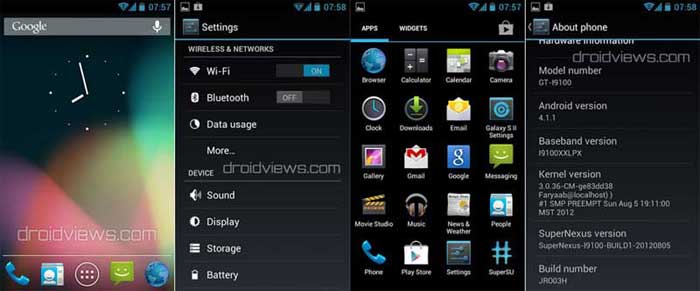
With SuperNexus I9100 (Jelly Bean/AOSP) ROM, you can experience a pure Jelly Bean on you very Samsung Galaxy S2. The ROM features Android Jelly Bean 4.1.1, latest CyanogenMod Kernel, all Jelly Bean features and apps and many others.
Features of SuperNexus I9100 (Jelly Bean/AOSP) ROM:
- Fully Deodexed
- Zipaligned APKs
- Rooted (Super SU)
- BusyBox Installed
- No 3rd Party App
- ZERO Bloatware
- Official Jelly Bean Bootanimation (From Official Nexus S Android 4.1.1 Factory Image)
- Init.d Support
- Bash & Nano Support
- Native SIP/VOIP Support
- OpenVPN Support
- EXT4 File System Optimizations
- Boot Animation Performance Enhancements
- Galaxy S II Device Settings as an App
- Extended Power Menu (Reboot, Recovery & Download Options)
- Powerkey Camera Shutter (Click Power Button To Capture Image/Video in Camera App)
- Device Hardware Information (Settings>About Device>Hardware Information)
- T9 Dialer Functionality (Smart Dialer)
- Landscape Dialer Support
- Increased Tab Limit in Stock Browser From 16 To 64
- Huge APN & SPN List
- Tweaked Progress Spinners Values (Silky Smooth Loading Spinners)
- Allowed Any File-Type To Be Downloaded
- Allowed Installation Of Apps From Unknown Sources By Default
- Disabled Data Roaming By Default
- Improved Scrolling Cache
- Reduced Boot Time
How to Install:
Follow the same steps as described above under “X-TremE CM10 Pure ROM” topic. To flash the GApps, copy
the file to SD Card and just repeat the Steps 7-8.
Download Latest SuperNexus I9100 (Jelly Bean/AOSP) ROM
Download Jelly Bean GApps
Mirror for JB GApps
[
source]
3. MIUI ICS ROM for Samsung Galaxy S2

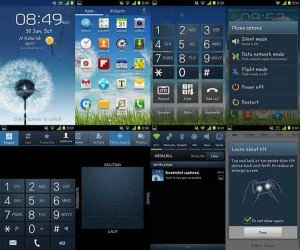
This is one of the best and most popular ROMs for Samsung Galaxy S II. The MIUI ROM gives you the look and feel of the iOS and the functionality of Android OS.
You can get all about this ROM with complete installation guide
HERE.
4. SalmanRom V4 SGS3 Themed ROM for SGS2

If you are thinking of buying a Samsung
Galaxy S3, just hold a minute and rethink. Here is the SalmanRom V4
(SGS3 Themed ROM) for SGS2 that can give you a pure Galaxy S3 experience
on you present device. The ROM is full of features. It is fast and
battery-friendly. I have used it for 20 days and still think it is one
of the best.
To get
the download link, features and installation guide for the SalmanROM V4 click
HERE.
5. Resurrection Remix JB ROM GT-I9100
Developer: Westcrip (
Donate)

Resurrection Remix JB ROM GT-I9100 is
yet another Jelly Bean ROM for SGS2. It’s a feature packed ROM with
great customization options. Resurrection Remix ROM is based on AOKP,
CM9/10. As a result, you get an awesome combination of performance,
customization, power and the most new features, brought directly to your
Device.
How to Install the Resurrection Remix JB ROM:
- Download and copy the ROM file in zip to your device via USB.
- Turn off the device and boot into CWM Recovery.
- Backup your current ROM
- Wipe data / factory reset (mandatory if you coming from ICS version or another ROM)
- Install the Main ROM via “install zip from sdcard” option.
- In Aroma installer select “Custom Installation”
- Choose from the options you prefer.
- When the installation finishes, uncheck the “Reboot Now” option
- Go back and open “advanced” option and Wipe Dalvik Cache, Fix Permissions
- Wipe Cache Partition
- Finally, reboot device from the main menu.
Resurrection Remix JB ROM GT-I9100
Mirror 1 Mirror 2
[
source]






Komentar
6 tanggapan untuk "PORTING ROM LENOVO UNTUK CROSS A7*"
Ilup Al pada 01:07, 01-Mei-13
Kunjungan malam masta. Sehat slaluWapedia pada 20:27, 01-Mei-13
Nyimak aja gan..ditunggu kunbalnya
adam b pada 18:41, 20-Mei-13
pasword linknya apa ganarif pada 20:03, 20-Agu-13
password nya apa gan?hantu hantuan pada 12:06, 27-Agu-13
kalau boleh tau password untuk lenovo.zip apa ???arief pada 00:20, 20-Agu-14
0m cara porting na gi mana?Langganan komentar: [RSS] [Atom]
Komentar Baru